HTML Editors
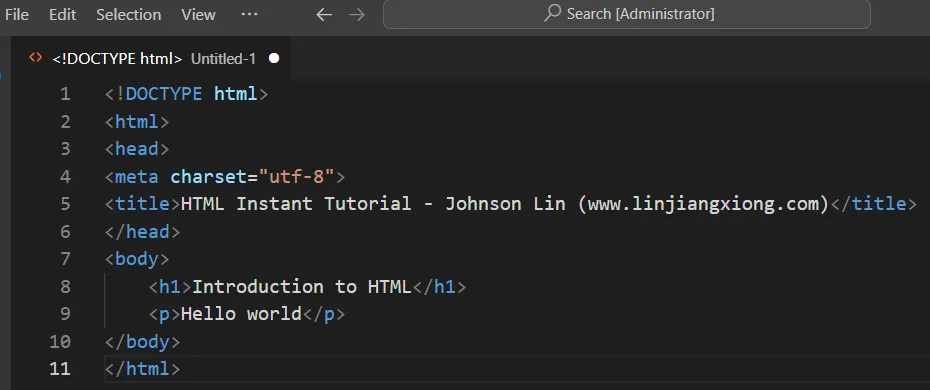
Recommended HTML EditorsFor editing HTML, using a professional HTML editor can be very helpful. Here are a few commonly recommended editors: VS Code: https://code.visualstudio.com/ Sublime Text: http://www.sublimetext.com/ You can download the software from their official websites and follow the installation instructions. Next, we’ll demonstrate how to use VS Code to create an HTML file. Visual Studio CodeVisual Studio Code (VS Code) is a code editor developed by Microsoft. It is open-sourc...
HTML Instant Tutorial
HTML is the foundation of web development. This tutorial provides a comprehensive introduction to HTML, serving both as an entry-level guide for beginners and a reference manual for looking up syntax. Table of Content Introduction to HTML Introduction to HTML URL HTML Element Attributes Understanding Text Encoding and Character Representation in HTML HTML Semantic Tags HTML Text HTML List HTML Image HTML <a> Tag HTML <link> Tag The <script> and <noscript> Tags HTML Mul...
HTML Elements
This chapter introduces some recently adopted standard tags. <dialog>Basic UsageThe <dialog> tag represents a dialog box that can be closed. 123<dialog> Hello world</dialog> The above code shows a simple dialog box. By default, the dialog is hidden and does not display on the webpage. To make the dialog visible, you must add the open attribute. 123<dialog open> Hello world</dialog> The above code will display a box on the webpage with the content “Hello w...
HTML Form
A form is a way for users to input information and interact with a webpage. In most cases, the information submitted by users is sent to the server. For example, a website’s search bar is a type of form. A form consists of one or more elements, such as text fields, buttons, radio buttons, or checkboxes. These elements are known as controls. <form>IntroductionThe <form> tag is used to define a form, which acts as a container for all the form elements. 123<form> <!-- Vario...
HTML Table
A Table displays data in rows and columns. <table>, <caption>The <table> tag is a block-level container that must enclose all the table content. 123<table> ... ...</table> The <caption>, which is always the first child element of <table>, provides the table’s title. This element is optional. 123<table> <caption>Example Table</caption></table> <thead>, <tbody>, and <tfoot>The <thead>, <tbody>, an...
HTML iframe
The <iframe> tag is used to embed other web pages within the current webpage. Basic UsageThe <iframe> tag creates a specified area to display another web page. It acts as a container element. If the browser does not support <iframe>, it will show the nested content. 12345<iframe src="https://www.example.com" width="100%" height="500" frameborder="0" allowfullscreen sandbox> <p><a href="https://www.exa...
HTML Multimedia
Webpages can include not only images but also videos and audio. <video>The <video> tag is a block-level element used for embedding video. If the browser supports the video format, it displays a player; otherwise, it shows the content inside the <video> tag. Here’s an example code snippet: 123<video src="example.mp4" controls> <p>Your browser does not support HTML5 video. Please download the <a href="example.mp4">video file</a>.&l...
The <script> and <noscript> Tags
The <script> tag is used to embed scripts, typically JavaScript, into a web page. The <noscript> tag specifies content to be displayed when a browser doesn’t support scripting or has it disabled. Using <script>The <script> tag is primarily used to load JavaScript code: 123<script>console.log('hello world');</script> This code will execute immediately when embedded in a webpage. Loading External Scripts: You can also use <script> to load exte...
HTML <link> Tag
OverviewThe <link> tag is primarily used to connect the current webpage with related external resources and is usually placed inside the <head> element. Its most common use is to load CSS stylesheets. 1<link rel="stylesheet" type="text/css" href="theme.css"> The code above loads the stylesheet theme.css for the webpage. In addition to the default stylesheet, a webpage can also load alternate stylesheets that are not applied by default but can be...
HTML <a> Tag
IntroductionLinks (hyperlinks) are fundamental to the internet. They enable users to navigate from one webpage to another, connecting all resources online. The <a> tag represents a hyperlink. It allows users to link to other pages, text, images, files, or even specific sections within the same page. In essence, any resource on the web can be accessed via an <a> tag. Here’s an example of a typical link: 1<a href="https://wikipedia.org/">Wikipedia</a> In the co...
HTML Image
Images are a crucial part of the internet, adding richness and variety to web pages. This chapter will cover how to insert images into a webpage. <img>The <img> tag is used to insert images and is a self-contained tag with no closing counterpart. 1<img src="foo.jpg"> The above code inserts an image foo.jpg into the webpage. The src attribute specifies the image’s URL, which in this case is a relative URL, indicating that the image is in the same directory as the we...
HTML Lists
Lists are collections of organized items, primarily divided into two types: ordered and unordered.Ordered lists feature numbered items, displaying a clear sequence, like this:1231. Item A2. Item B3. Item CUnordered lists, on the other hand, use bullet points instead of numbers:123• Item A• Item B• Item C <ol>The <ol> tag creates an ordered list container. It automatically generates numbers for each list item. This tag is ideal for content where the order matters, such as rankings....
HTML Text
Historically, web pages were mainly used for displaying text, so HTML includes a variety of text formatting tags. <div>The <div> tag is a generic container that represents a division or section in a document. It has no semantic meaning, so it’s often used as a block-level element when no other suitable tag is available.Its most common use is to provide CSS hooks for styling purposes. In the past, it was common to see deeply nested <div> elements for layout:1234567<div cla...
HTML Semantic Tags
HTML tags are designed to be semantic, meaning they convey the purpose and structure of the content they encapsulate. When using HTML, it’s crucial to choose tags that accurately represent the meaning of your content. This practice of semantic HTML naturally results in well-structured web pages that are easier for developers to read, write, and maintain. It also helps computers better process and understand web content. The Importance of Semantic HTMLOne of the key functions of HTML tags is...
Understanding Text Encoding and Character Representation in HTML
IntroductionA webpage contains a large amount of text, and the browser needs to know the encoding method of this text in order to display it correctly.Typically, when a server sends an HTML file to the browser, it specifies the webpage’s encoding method through the HTTP header.1Content-Type: text/html; charset=UTF-8In the example above, the Content-Type field in the HTTP header first indicates that the data being sent by the server is of type text/html (i.e., an HTML page), and then specifies...
HTML Element Attributes
IntroductionHTML element attributes customize the behavior of elements. Different attributes lead to different behaviors. Attributes are written as “key-value pairs” inside HTML tags.For example:1<html lang="en">In this code, lang="en" within the <html> tag is an attribute of the htmlelement. The attribute name is lang, and its value is en. Attribute names, like tag names, are case-insensitive. lang and LANG refer to the same attribute. Attribute names and valu...
Introduction to HTML URL
OverviewURL stands for “Uniform Resource Locator,” commonly known as a web address. It represents the internet address of various resources. Here’s a typical URL:1https://www.example.com/path/index.htmlResources can be understood as any files accessible via the internet, such as web pages, images, audio, video, JavaScript scripts, and more. Knowing their URLs is essential to access them on the internet.Any resource accessible through the internet must have a corresponding URL. While one URL c...
Introduction to HTML
OverviewHTML is the language of the web, defining the structure and content of web pages. When a browser visits a website, it essentially downloads HTML code from the server and renders it into a webpage. HTML stands for “HyperText Markup Language,” invented in the early 1990s by Tim Berners-Lee, a physicist at CERN (European Organization for Nuclear Research). Its most distinctive feature is support for hyperlinks, allowing users to jump to other web pages with a simple click, thus forming t...
JSON Array
JSON (JavaScript Object Notation) is a lightweight data-interchange format that’s easy to read and write for humans and easy to parse and generate for machines. One of the key components of JSON is the JSON Array. What is a JSON Array?A JSON array is an ordered collection of values. These values can be of any data type: strings, numbers, objects, arrays, booleans, or even null. The array is enclosed in square brackets ([ ]), and each value is separated by a comma.Example of a JSON Array:12345...
JSON Object
SyntaxExample:1{ "name": "Johnson", "age": 28, "site": null }JSON objects are written using curly braces {…}. They can contain multiple key/value pairs. Keys must be strings, while values can be any valid JSON data type (string, number, object, array, boolean, or null). Keys and values are separated by colons (:), and each key/value pair is separated by commas (,). Accessing Object ValuesYou can use dot (.) notation to access object values:123...